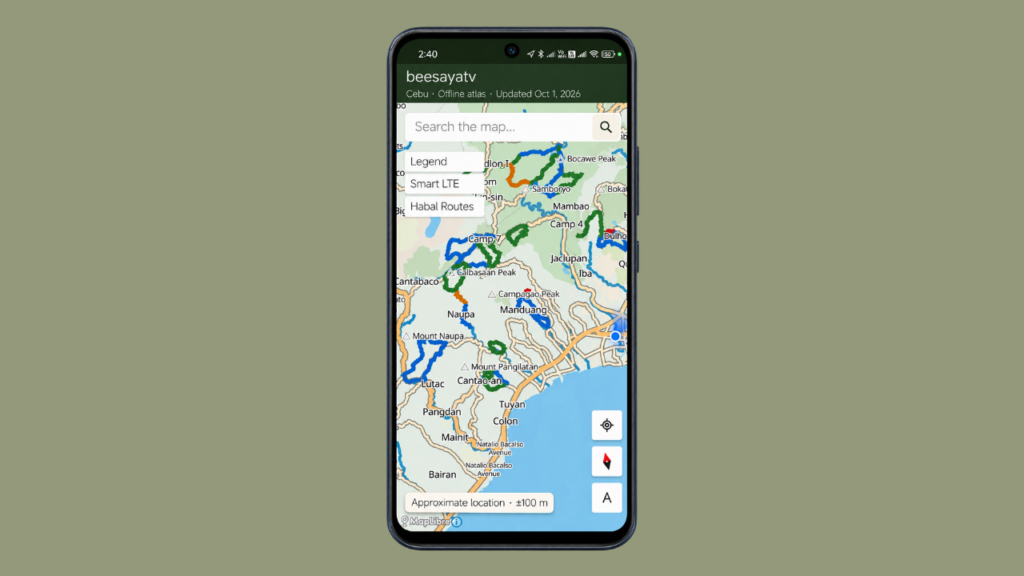
The beesayatv Trail Atlas App is an offline Android map viewer for exploring the documented trail network and supporting field data for Cebu.
- Purpose — Provides access to documented trails, geographic features, and reviewed field observations included in the Trail Atlas.
- Offline operation — Uses a validated atlas bundle stored locally on the device, keeping maps, routes, and included observations available without an internet connection.
- Platform — Android application distributed through manual APK installation.
- Data scope — Displays the datasets included in the current offline atlas bundle. Some features available in the web-based Trail Atlas have not yet been ported to the Android application.
1. Installation
- APK download — Download beesayatv Trail Atlas App v1.0.
- Distribution — The application is not currently available through Google Play.
- Manual installation — Download the APK and install it on a compatible Android device.
- Installation permission — Android may require permission to install applications from the source used to download the APK.
2. Offline Cebu Basemap
- Local basemap — Includes a detailed Cebu basemap stored on the device.
- Geographic features — Displays roads, places, water features, peaks, and other map labels.
- Offline availability — Basemap data remains accessible without an internet connection.
- Regional coverage — The atlas exporter filters geographic data to the Cebu region before generating the application bundle.
3. Trail Routes and Difficulty
- Route display — Shows documented trail routes on the map with their trail names and difficulty levels.
- Difficulty classification — Displays the difficulty information assigned to each documented trail.
- Mixed-difficulty routes — Supports routes containing sections with different difficulty levels.
- Incomplete routes — Allows work-in-progress routes to be included in the atlas.
- Route independence — Trail routes are displayed as documented geographic data rather than generated navigation instructions.
4. Trail Search and Selection
- Trail search — Searches for trails by title.
- Search results — Displays available trail difficulty information alongside matching results.
- Map positioning — Locates the selected trail on the map.
- Route highlighting — Highlights the selected route while dimming other trail routes.
- Trail details — Opens a details panel containing available information about the selected route.
- Trail Report link — Provides a link to the corresponding Trail Report when one is available.
5. Trail Route Cues
- Start marker — Displays a start-point marker for the selected route when available.
- Directional chevrons — Shows directional cues along the route to indicate the direction represented by the atlas data.
- Route interpretation — Helps users understand the documented route geometry without implying guaranteed navigational accuracy or current trail conditions.
6. Trail Reports
- External reports — Selected trails may link to their Trail Reports on the beesayatv website.
- Online access — Opening a report requires an internet connection and a browser.
- Offline limitation — Trail Reports are not stored as offline content within the application.
- External media — Videos and other website content are not downloaded for offline use.
7. Contextual Points of Interest
- Context POIs — Includes geographic points of interest associated with documented routes and their surrounding landscapes.
- Geographic context — Helps users identify relevant features while exploring the map.
- Independent map data — POIs provide contextual information and remain separate from trail route geometry.
8. Landscape Observations
- Field observations — Displays landscape observations included in the offline atlas dataset.
- Map representation — Presents observations as geographic map data.
- Documentation source — Observations originate from field documentation.
- Separate evidence — Landscape observations remain distinct from the trail route itself.
9. Habal-Habal Routes
- Access route overlays — Displays reviewed habal-habal routes associated with the documented trail network.
- Access context — Provides geographic context for documented access routes.
- Offline storage — Habal-habal route data is included in the locally stored atlas bundle.
- Coverage limitation — Documented routes do not guarantee current accessibility or transport availability.
10. Smart LTE Observations
- Connectivity overlay — Supports an optional map layer containing Smart LTE observations collected during field visits.
- Field measurements — Represents recorded connectivity observations rather than a live network coverage service.
- Offline display — Included observations can be viewed without an internet connection.
- Data interpretation — Observations do not guarantee present-day signal availability.
11. Optional Map Overlays
- Layer controls — Allows available additional atlas layers to be enabled or disabled.
- Local datasets — Reads overlay data from the stored atlas bundle.
- Offline availability — Included overlays do not require a live connection to be displayed.
- Dataset dependency — The availability of each layer depends on the data included in the current atlas export.
12. Live Location and GPS
- Current position — Displays the user’s current position on the map when location access is enabled.
- Android permission — Requires location permission to access the device’s location.
- Offline map access — Location permission is not required simply to browse the offline basemap and atlas datasets.
- GPS status — Reports the availability of the current location reading.
- Accuracy display — Shows estimated horizontal GPS accuracy in metres.
- Accuracy limitation — Indicates the estimated precision of the location reading, not a guaranteed error bound.
13. Location Following and Compass Heading
- Location following — Allows the map to follow the user’s current position while moving.
- Heading following — Can follow the user’s compass heading when supported by available sensor data.
- Sensor dependency — Directional behavior depends on the availability and reliability of device sensor readings.
- Navigation limitation — Location following and compass heading assist map orientation but do not constitute a complete turn-by-turn navigation system.
14. Map Label Settings
- Label-size adjustment — Allows the user to adjust map label sizes.
- Persistent preference — Retains the selected label-size setting between application launches.
- Readability — Provides control over map label presentation according to the user’s viewing preference.
15. Local Atlas Storage
- Local dataset — Stores the atlas bundle on the Android device.
- Bundle contents — Contains the map data and atlas datasets required by the application.
- Offline continuity — Allows the app to continue using its saved atlas without a network connection.
- Independent operation — Map viewing, trail browsing, search, route display, and included overlays do not depend on a live database connection.
16. Automatic Atlas Updates
- Update check — Checks the beesayatv website for a newer atlas bundle whenever the application is opened and an internet connection is available.
- Update download — Downloads a newer bundle when one is available.
- Bundle validation — Validates the downloaded files before accepting the new bundle.
- Replacement behavior — Replaces the existing local atlas only after the new bundle passes validation.
- No update available — Continues using the current local atlas.
- Connection failure — Retains the previously saved atlas if the website cannot be reached.
- Validation failure — Continues using the previously saved atlas if the downloaded bundle cannot be validated.
- Offline limitation — Automatic update checks require an internet connection. The saved atlas remains available when the device is offline.
17. Atlas Integrity and Validation
- Bundle validation — Verifies the atlas bundle before accepting it as the active local dataset.
- Manifest — Includes a manifest describing the exported bundle.
- File checksums — Uses checksums to verify the integrity of the bundle’s files.
- Safe replacement — Prevents an unvalidated update from replacing the previously saved atlas.
- Data consistency — Helps ensure that the application uses a complete, validated copy of the exported atlas.
18. Features Available Only in the Web-Based Trail Atlas
The following features are available in the web-based beesayatv Trail Atlas but have not yet been ported to the offline Android application.
- Photo Dots — Georeferenced photographic observations displayed as individual points on the web map.
- Drone Surveys — Drone survey records and associated geographic documentation available through the web-based system.
- Offline limitation — These features are not currently included in the offline atlas bundle and cannot be browsed through the Android application.
- Future integration — Their inclusion in the offline app would require the relevant data and supported display functionality to be incorporated into the atlas export and Android viewer.
19. Current Atlas Bundle
The inspected September 14, 2026 bundle contains the following datasets:
- Trails — 25 documented trail routes.
- Habal-habal routes — 23 documented access routes.
- Connectivity — Smart LTE observations.
- Surface data — Reviewed surface data.
- Context POIs — Geographic points of interest.
- Landscape observations — Field-documented landscape features.
These counts describe the inspected bundle only. They may change when a newer atlas is exported. Photo Dots and Drone Surveys are not included in this bundle.
20. Offline and Online Functions
- Available offline
- Cebu basemap and map labels.
- Trail browsing, search, and route selection.
- Route highlighting and directional cues.
- Included POIs and landscape observations.
- Included habal-habal routes and Smart LTE observations.
- Other supported overlays contained in the local atlas bundle.
- Requires an internet connection
- Automatic atlas update checks and downloads.
- Opening external Trail Reports in a browser.
- Accessing external videos and other website content.
- Not yet available in the offline app
- Photo Dots.
- Drone Surveys.
- Not provided by the app
- Live trail-condition reports.
- Live weather information.
- Offline copies of Trail Reports and videos.
- A live trail database.
- Complete turn-by-turn navigation.
Documentation Principle
The beesayatv Trail Atlas App is a local viewer for the documented atlas, not a live trail database or a complete navigation service.
- Displayed information reflects the current local atlas bundle.
- Offline availability depends on the datasets included in that bundle.
- GPS readings and directional cues have practical limitations.
- Documented routes and access information do not guarantee current trail conditions or accessibility.
- Web-based features are not automatically available offline; each must be incorporated into the atlas bundle and supported by the Android application.